Skip to main content

NDIS provider software

Run your NDIS service from one simple workspace.

Participants, rosters, progress notes, timesheets, invoices and NDIS claims, all in one place, built for NDIS providers across Australia.


  • Built for Australian providers
  • Import your spreadsheets
  • No card required
  • Supported from Adelaide

Home at 9:12 on a Thursday morning. These are real FormaOS screens. The provider is a sample and every name is invented.

  1. TodayWho is out, what is under way, and any shift with no worker.
  2. Needs youReportable incidents, missing notes and expired checks, with the urgent work first.
  3. Coming upWorker checks and NDIS plans that run out in the next 30 days.
  4. On a worker’s phoneTheir day, the shift under way, and the note to write after it.
The Roster screen: the week of 2 to 8 November as a grid, with a row for each worker and a row for open shifts. Each shift shows its times, its participant and the support. Finished shifts are marked Done and one is marked Missed.

RosterBuild the roster, fill open shifts and see who clocked in.

  • A row for each worker and a column for each day.
  • An open shift sits at the top until someone takes it.
  • Done, missed and under way are all marked on the shift.
The Notes screen: progress notes written by workers, each with the participant and the time it was written, and either a Sign off button or a Signed off mark.

NotesWrite progress notes from a phone as you leave.

  • Every finished shift needs a note.
  • Anything missing from the last 14 days comes first.
  • Managers sign notes off from the list.
The Incidents and complaints screen: six reports with their type, participant, date, severity and status. The top report shows NDIS Commission: 9 hours left.

IncidentsLog incidents and complaints in one register.

  • The severity and status of every report.
  • A clock on anything reportable to the NDIS Commission.
  • Filter by severity, or by what is still open.
The Participants screen: 12 sample participants, each with an ID, next shift, plan end date and risk level, with filters above the list.

ParticipantsKeep participant information, plans, budgets and invoices in one place.

  • The next shift and plan end date on every row.
  • Filter by high risk, emergency flag or plan ending soon.
  • Import brings your existing spreadsheet across.
The Workers screen for a sample team. Two expired checks sit at the top of the list in red, followed by three checks that are expiring soon.

WorkersManage your team, their checks, timesheets and payroll files.
  • Expired checks rise to the top of the list.
  • Filter by expired, expiring soon or invited.
  • Export checks and documents gives you the whole register.
The FormaOS Home screen: a timeline of today’s shifts by worker, a Needs you list with four urgent items, and a Coming up list of five checks and plans.

HomeOpens on what needs you today, before anything else.

  • Sorted into Now and Soon, so the urgent work comes first.
  • One line for the day, with the time marked and gaps flagged.
  • Checks and plans that run out in the next 30 days.

From spreadsheet to workspace

Spreadsheets store the work. FormaOS chases it.

Workers_FINAL_v3 (use this one).xlsx
WhoWhatDateComment
Tom W.First aid2 Novrenew??
Jess K.Driver licence14 Mar
Priya N.Worker screening17 Nov
Maya L.Plan end date26 Novask plan mgr
Sam R.First aid9 Feb
Ben T.11:30 personal care4 Novnote???
Liam F.Fall in shower4 Novtell NDIS??
Ruth A.Plan end date30 Jun
Jess K.First aid1 Dec
Ethan W.Plan end date2 Dec
Amara O.First aid3 Dec
The Needs you and Coming up lists on FormaOS Home. Needs you shows a shift with no worker, a report owed to the NDIS Commission, 5 shifts without a progress note and 2 expired worker checks. Coming up shows Priya Nair’s worker screening in 12 days and Maya Lindqvist’s NDIS plan in 21 days.
The same morning, both ways. In FormaOS the dates come to you, sorted by what is urgent. The provider is a sample and every name is invented.

Made for the NDIS

Built around the rules you work under.

24 hours to tell the NDIS Commission.

A reportable incident shows its deadline, and the hours left to lodge it.

Liam Fraser’s injury report in FormaOS. A clock on the report reads: Notify the NDIS Commission by Thu 5 Nov, 6:20 pm ACDT, 9 hours left. Under it are fields to record when it was lodged and its reference, and a Record as lodged button.
Every check current, for every worker.

An expired one is marked on the worker, and on Home.

Tom Whitfield’s checks and certificates in FormaOS. First aid, 2 Nov 2026, is marked Expired. NDIS Worker Screening, 6 Aug 2028, is marked Verified.
Every shift needs a progress note.

Shifts from the last 14 days with no note come first.

The Notes screen in FormaOS. It reads: Every finished shift needs a note. Anything missing from the last 14 days comes first. Under No note, 5, each shift without a note shows its participant, time and worker, with a Write note link.
30 days of warning before a plan ends.

Plans that end soon show on Home and on the participant.

Coming up on Maya Lindqvist’s record in FormaOS: a shift under way, community access tomorrow at 1:00 pm with Jess Kowalski, her NDIS plan ending on 26 November in 21 days, and a support plan review on 8 February.

Shifts run through to invoices and the NDIS bulk claim file for PRODA, and an auditor can have a read-only link.

Not in FormaOS yet: your policies, and your risk, improvement and training registers. Keep those in your own system for now.

Notes from a phone

The note gets written before they leave.

Workers write the note on their phone as they leave, so nobody is chasing paperwork on Friday afternoon.
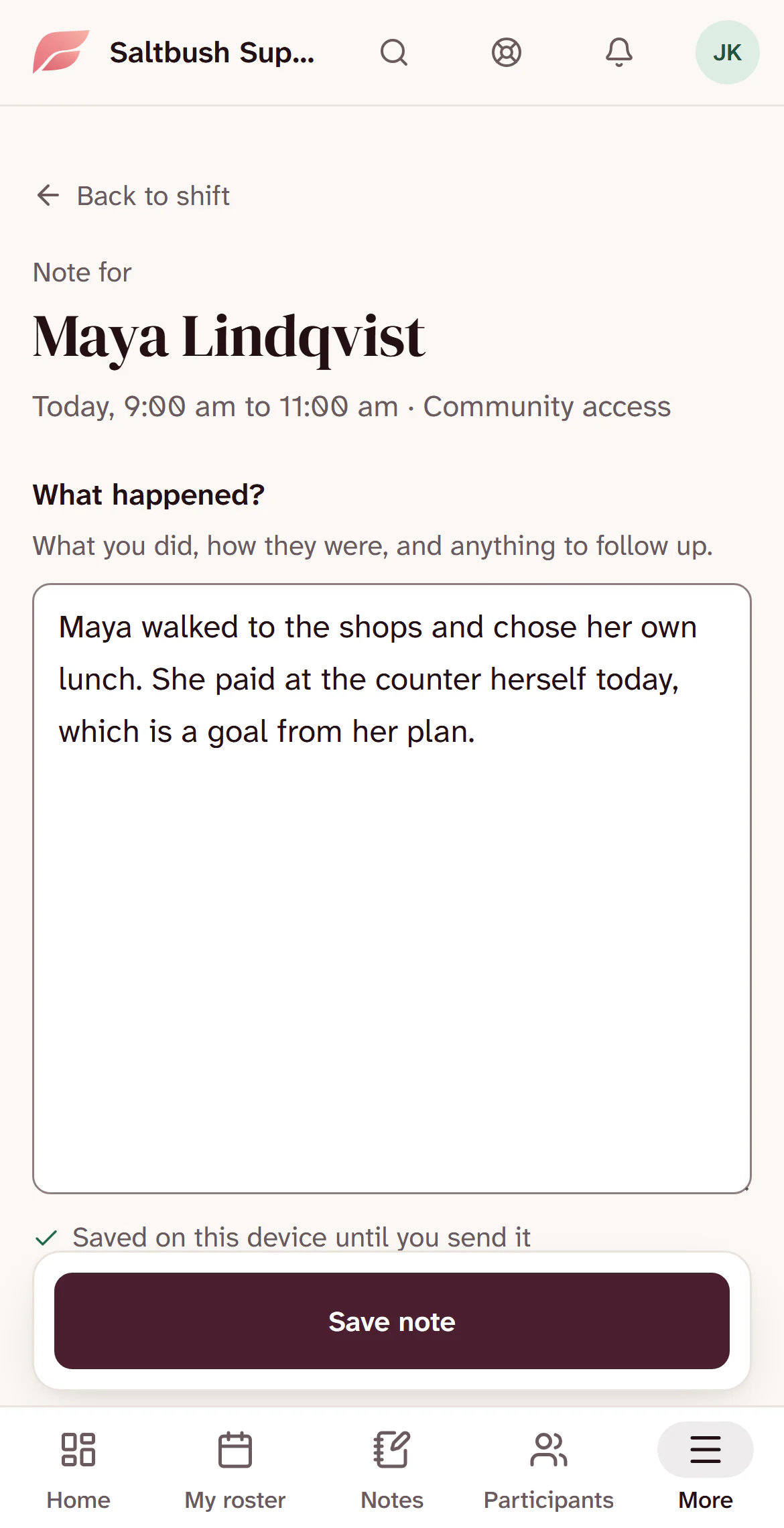
  • Lands against the right participant and shift
  • Keeps the time and who wrote it
  • Stays saved on the phone until it is sent
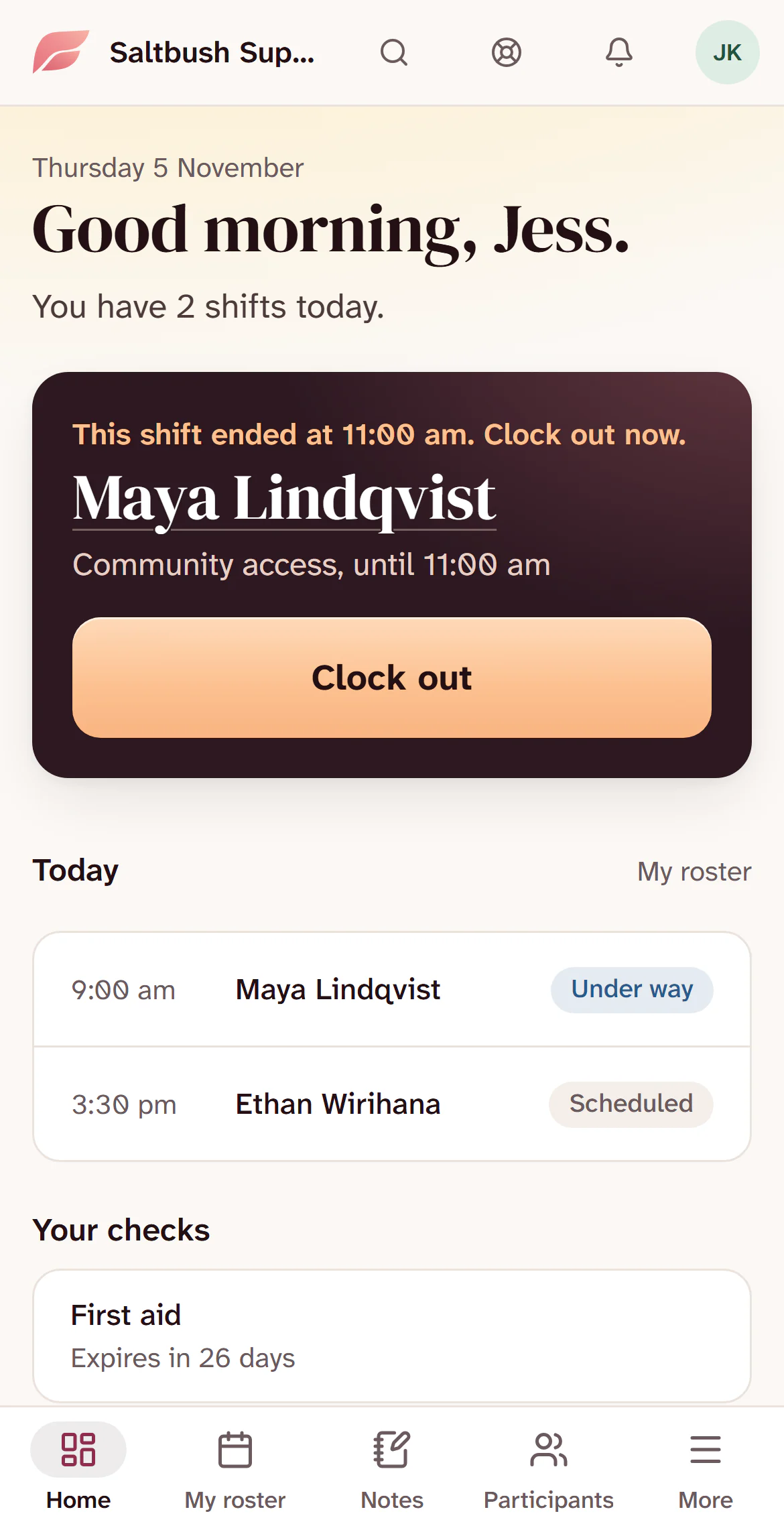
A support worker’s home screen on a phone. A card reads: This shift ended at 11:00 am. Clock out now. Maya Lindqvist, Community access, with a Clock out button.
11:02. The shift has ended, and the app tells Jess to clock out.
The note screen on a phone, headed Note for Maya Lindqvist, Today, 9:00 am to 11:00 am, Community access. The worker has written what happened, above a Save note button.
Clocking out opens the note on the right shift, so there is nothing to pick.

How it works

Moved across, not typed in twice.

  1. Start free

    An email address or Google. No card.

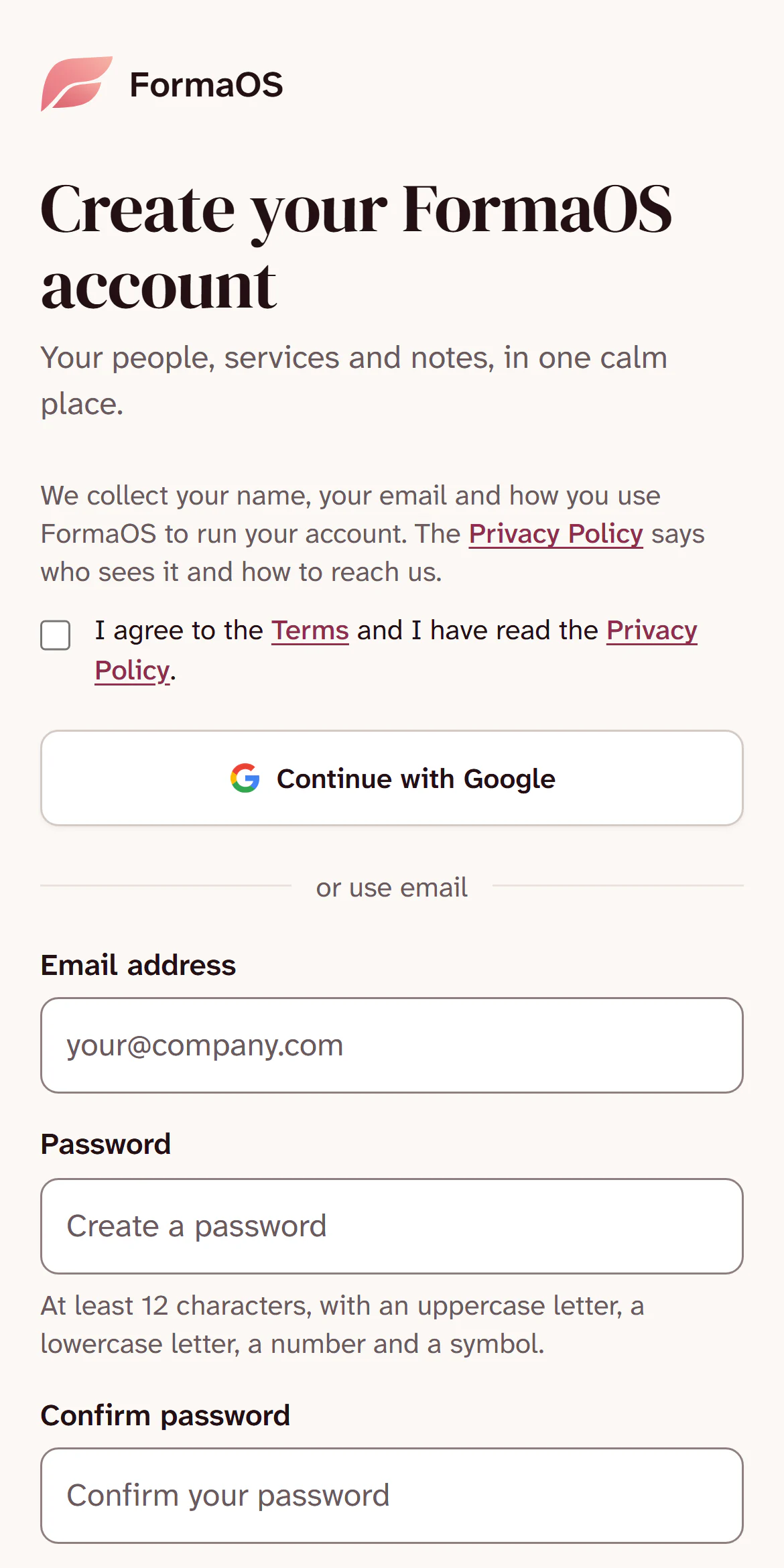
    The FormaOS sign-up page on a phone: Create your FormaOS account, a Continue with Google button, then fields for an email address and a password.
  2. Bring your spreadsheet

    Columns matched for you. On Growth, we load it.
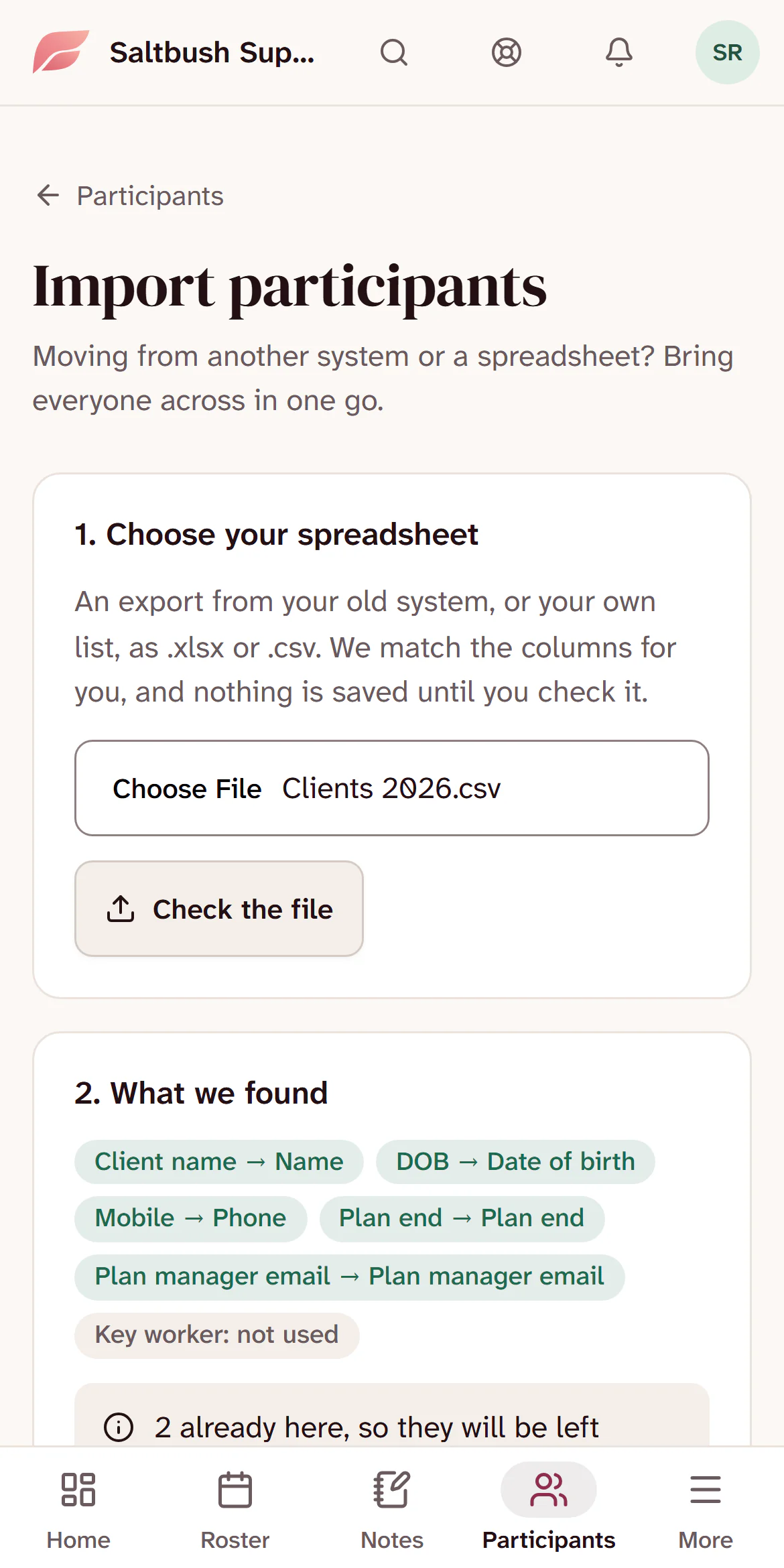
    Importing participants on a phone. A file called Clients 2026.csv is chosen, and What we found matches its columns: Client name to Name, DOB to Date of birth, Mobile to Phone, Plan end to Plan end, and Plan manager email. Key worker is not used.
  3. Invite your team

    Each worker signs in on their own phone.
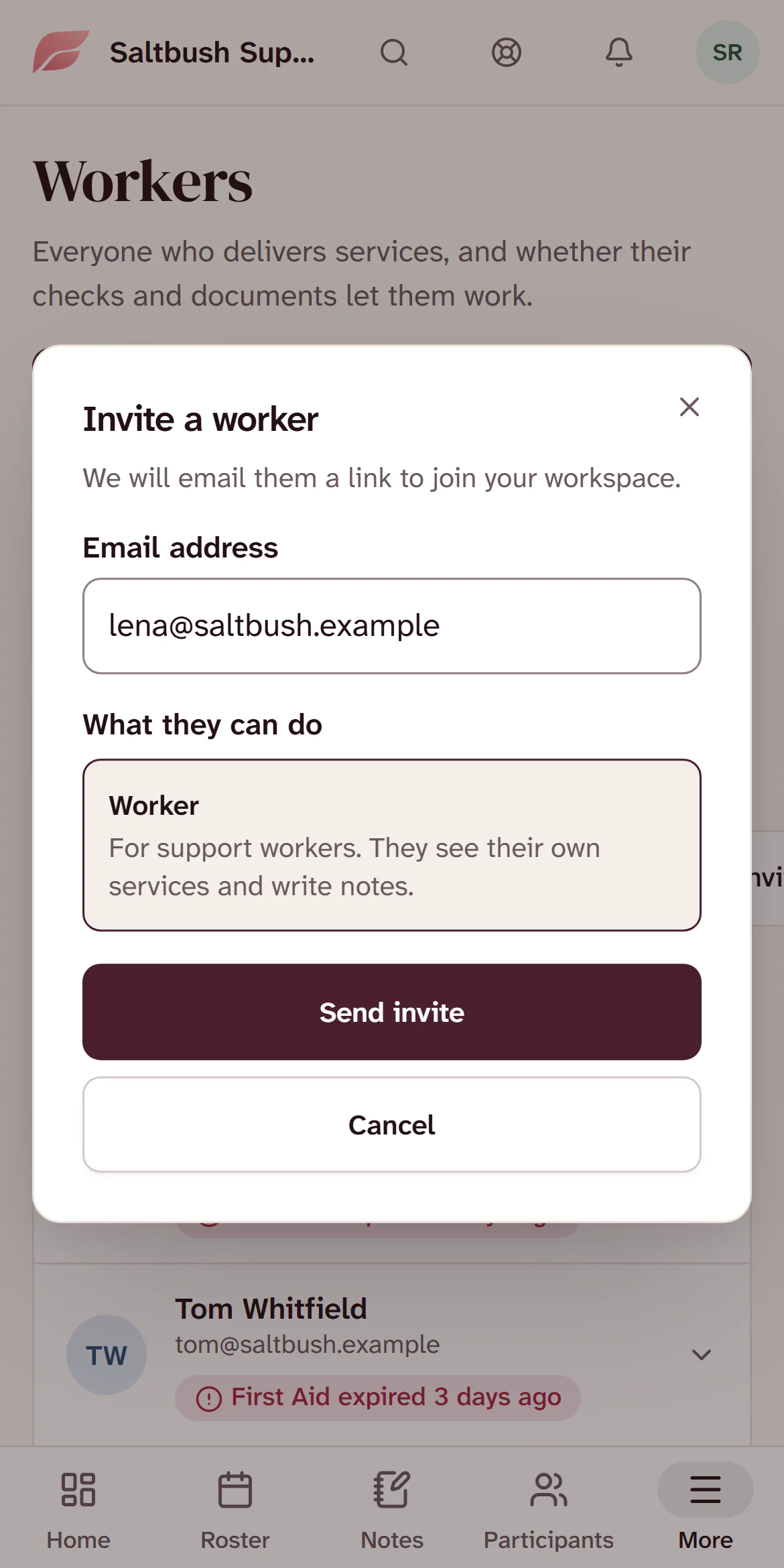
    Inviting a worker on a phone. The email address is lena@saltbush.example and the role is Worker, for support workers who see their own services and write notes. Under it is a Send invite button.
  4. Open Home each morning

    What needs you, first.

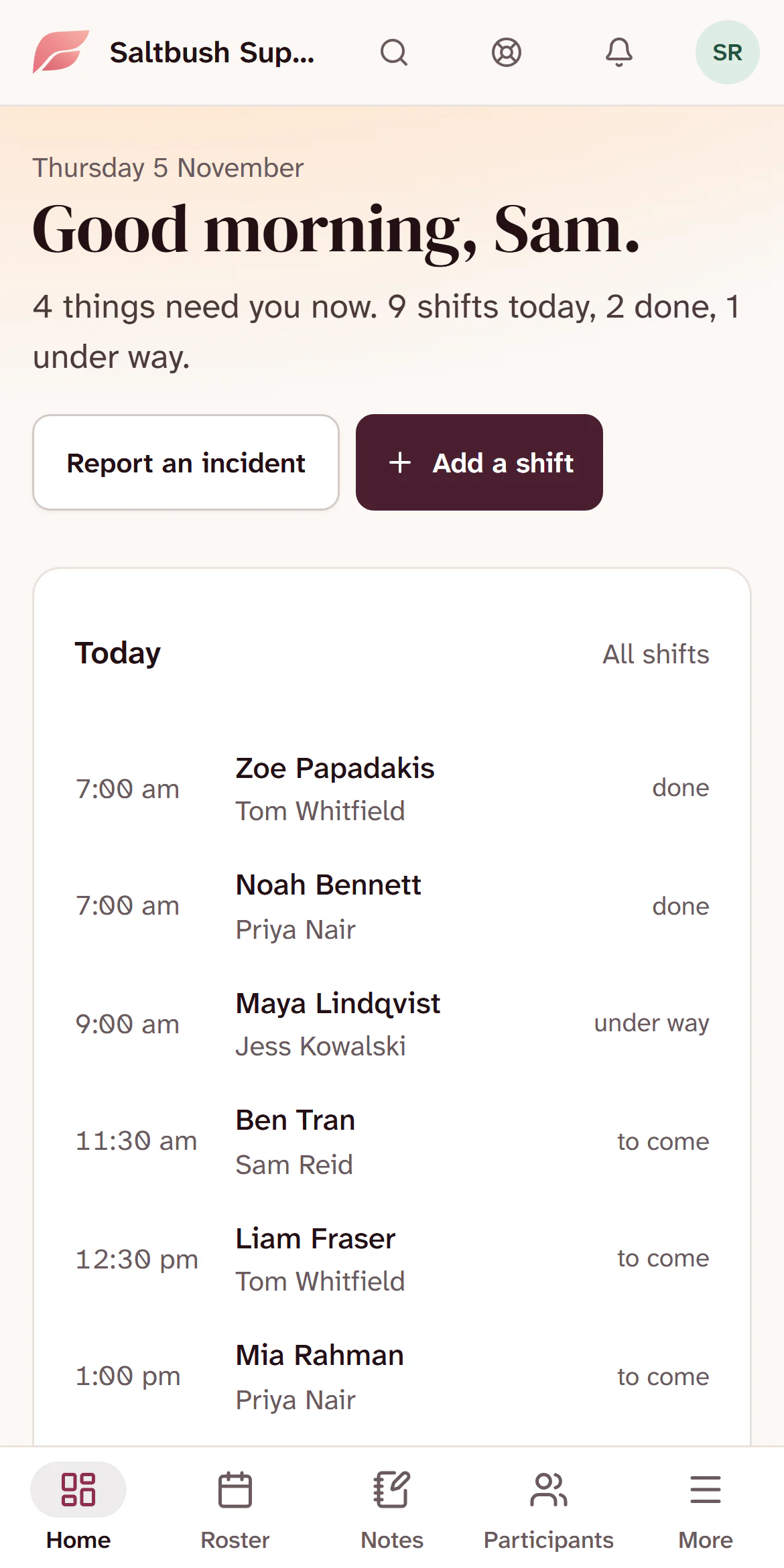
    FormaOS Home on a phone on Thursday 5 November: Good morning, Sam. 4 things need you now. 9 shifts today, 2 done, 1 under way. Below is the day’s list of shifts.

Works with

  • XeroInvoice file
  • GoogleSign-in
  • StripeCard billing
  • 5 – 30Workers per provider
  • 7 daysFree trial, no card
  • $0Setup fee
  • 2 plansFlat monthly price, no per-seat charges

Built for NDIS providers first. It also suits home and aged care, community nursing, allied health and psychosocial support.

Pricing

Two plans. One flat price.

For your whole organisation, set by the size of your team. 7 days free, and no card to start.

Foundation

$259a month, AUD

Everything one small provider needs, for up to 15 people.

Choose Foundation

Growth

$499a month, AUD

Room for up to 50 people, and we load your data for you.

Choose Growth

On both plans

  • Participant records, plans, budgets and referrals
  • Roster, open shifts, leave, and clock in and out from a phone
  • Progress notes, care plans, medications and incidents
  • Worker records with check and certificate expiry alerts
  • Timesheets, pay runs and payroll files
  • Invoices, NDIS bulk claim files and payments

Prices are in Australian dollars and any GST is shown at checkout.

Questions

What people ask before they start.

Anything not here, email support@formaos.com.au and the person who built the product will answer.

Who is it for?

Owner-run NDIS providers with roughly 5 to 30 workers. If one person is keeping participants, worker checks, rosters and notes in spreadsheets and a shared drive, this replaces those spreadsheets with one workspace. Home care, community nursing, allied health and psychosocial support providers have the same shape, a cleared worker visiting a funded person and writing a note, so they use it too. You pick your kind of provider at setup and the screens use your words.

What about my spreadsheets?

You can import your participants, workers, checks and rosters from a spreadsheet yourself on either plan, and you see what will load before anything saves. On Growth, upload your spreadsheets from Settings and we load them for you and check the dates as we go, so nothing gets typed in twice. We delete the files once they are loaded. Please do not email them to us.

Does it do NDIS claims?

Yes, for NDIA managed participants. Approved invoice lines go into the NDIA’s bulk claim file, which you upload in the myplace portal. Bring the portal’s results back in and paid lines are recorded as payments, while a rejected line shows why, so you can fix it and claim again. Plan managed, self managed and private invoices go out as PDFs by email. There is no direct link to the NDIA yet, so the upload is still yours to do.

How do support workers use it?

On their own phone, in its browser, so there is nothing to download and it can sit on the home screen. They see their own shifts and the participants they support, clock in and out, write the note as the shift ends, ask for open shifts, check their hours and ask for leave.

Can families see anything?

Only if you give them access, with the participant’s consent recorded first. A family member signs in with a link sent to their email, sees coming shifts and the worker’s first name, and can ask for a change. Notes, budgets and invoices only appear if you tick them, and Revoke ends access at once.

How does billing work?

Two flat plans per organisation: Foundation at $259 a month for up to 15 people, and Growth at $499 a month for up to 50. Every workspace starts with a 7-day free trial. Choose a plan here and you save a card through Stripe once your workspace is set up, or start the trial without a card and add one from Billing later. Either way nothing is charged until the trial ends, then the same date each month. Prices are in Australian dollars and any GST is shown at checkout.

Can I cancel?

Yes. There is no lock-in and no cancellation fee. Cancel from the billing page in your account, and you can export your participants, workers and notes before you go.

Will it get me through a registered provider audit?

It holds much of what an auditor samples: notes, the incident and complaint register, worker checks and signed agreements, and you can give an auditor a read-only link to them. It does not yet hold your policies, risk register, continuous improvement register or training register, so keep those in your own system for now.

Does it manage restrictive practices?

Not yet. There is no authorisation register, no warning when a plan or authorisation is due to end, and no log of each use for monthly reporting, so keep those in your own system. You can still report an unauthorised use as an incident, and that is tracked through to the NDIS Commission.

Elder Park and the Adelaide Convention Centre at dusk

Try it with your own participants and workers

7 days free, no card. Import your spreadsheets and see your own data in it.